

AI Engineering: Idea to Product
A lightweight development process that starts with an idea and ends with a tested, deployed product, with AI doing the work and humans deciding.
 Michael Shepherd 17 min read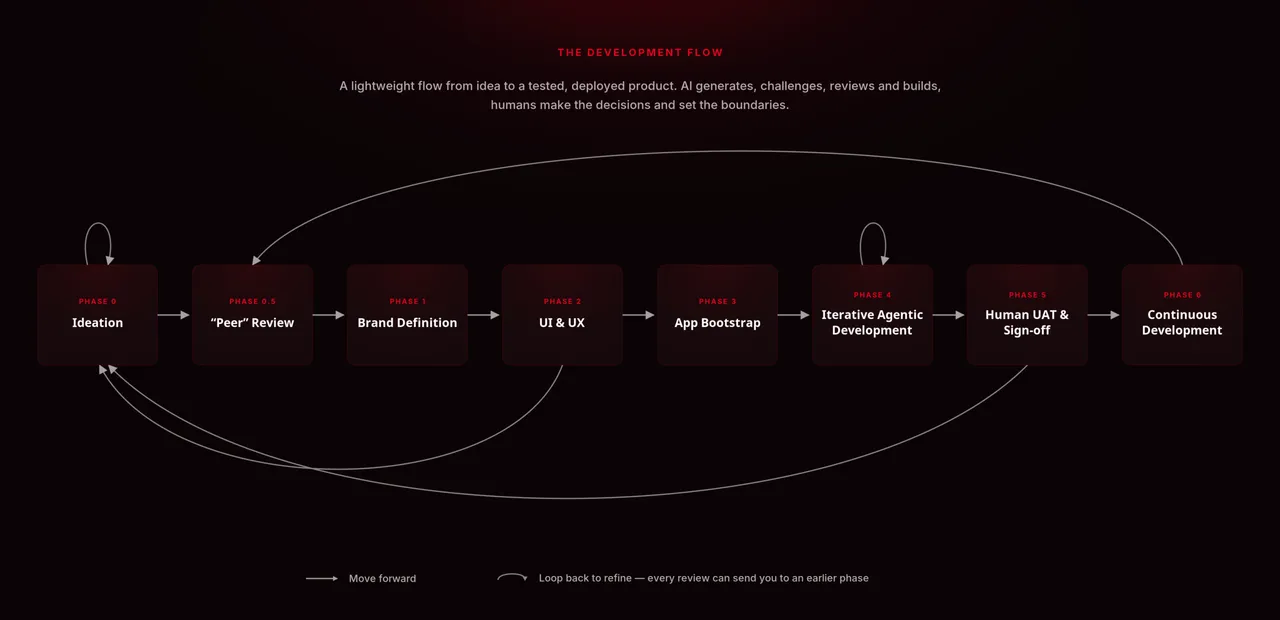
Almost everyone in tech has, at some point, thought about launching a SaaS product, selling it for billions and retiring on a yacht in the Mediterranean.
A fair number of people outside tech have probably had the same thought.
With the speed at which AI development tools are improving, the dream feels more realistic than it used to. Anyone with a Lovable or Base44 subscription can put together something that looks like a product in an afternoon. According to the AI companies, and roughly half of my LinkedIn feed, all that remains after that is a few quick tweaks before the money starts rolling in.
I do not buy it.
These tools are very good at producing something that looks finished. They are less good at producing everything that has to exist around the software before it can survive contact with real users.
Security, monetisation, legal research, compliance, product market fit, marketing, scalability, maintainability and observability are not the final ten percent. In many cases, they are most of the work.
Without those pieces, the things coming out of AI builders will remain what they were sold as: dreams.
My experience covers most of these areas at varying levels of depth across the startups, scale-ups and larger companies I have worked for and with. I am not claiming to be an expert in all of them. Very few people are.
I do think people with broad experience across product, engineering and operations are in a useful position right now. We can help founders make sense of the flood of AI generated software, work out what is real, and turn promising prototypes into products that can actually be launched and maintained.
The flow below is my current attempt at doing that.
It is a lightweight development process that starts with an idea and ends with a tested, deployed product on a solid foundation. AI does a lot of the work, but it does not make the important decisions on its own.
Phase 0: Ideation
A product may live or die based on execution, but good execution cannot rescue an idea that has not been thought through.
The first phase is a long conversation with an LLM about the product. The aim is not to get reassurance. It is to invite criticism, uncover assumptions and turn a vague idea into something specific enough to build.
LLMs can be spectacularly sycophantic if you let them. Tell one that you have a revolutionary startup idea and it will happily explain why you are about to reshape an industry.
You need to ask it to do the opposite.
Ask what is weak about the idea. Ask why users might not care. Ask who already solves the problem. Ask what would make the product expensive, risky or difficult to operate. Ask it to identify things you have avoided thinking about.
Then argue with it.
The output of this phase should be a feature specification that has survived a proper interrogation, not a transcript of you and a chatbot agreeing with each other.
Input
- Your idea, thought through as far as possible before starting
- Any known users, constraints, assumptions or commercial goals
Garbage in is still garbage out.
Outcomes
- A list of obvious risks
- Possible mitigations for those risks
- A clear definition of the product
- A detailed feature specification
- A better idea of what should not be included
Recommended tools
ChatGPT works well for the initial conversation. Use it to challenge the concept, explore the problem and develop the first complete version of the feature specification.
Things to avoid
- Prompting the model to praise the idea
- Ignoring risks because they are inconvenient
- Saying yes to every feature it suggests
- Treating the model’s reasoning as fact
- Letting the conversation drift into an endless list of possible features
Phase 0.5: “Peer” review
A good conversation with a capable model can produce something that feels extremely well considered.
That feeling is dangerous.
Modern LLMs are excellent at creating coherent documents. A specification can be clear, detailed and completely wrong at the same time.
This phase takes the specification out of the echo chamber created by the first conversation. Give it to other models and ask them to review it independently.
I call this Phase 0.5 because it is separate from ideation, but it will almost always send you back there. Every review should uncover questions, contradictions or assumptions that need to be resolved in the original specification.
Unless you and the first model are perfect, which you are not, something will have been missed.
Input
- Your feature specification
- The risks and assumptions identified in Phase 0
Outcomes
- A better feature specification
- New risks and edge cases
- A clearer split between essential features and nice ideas
- Questions that need to go back into the original product discussion
Recommended tools
Use Gemini and Claude independently, with the same initial prompt and the same specification.
Do not let one model see the other model’s review until both have finished. You want independent criticism, not two models converging on the same answer.
Things to avoid
- Allowing the reviewers to change the basic purpose of the product
- Ignoring feedback because you do not like it
- Adding every suggestion to the specification
- Mistaking more features for a better product
Phase 1: Brand definition
Most software engineers will want to skip this phase.
Do not.
Brand has never been a standard part of the engineering workflow, but it affects almost every customer-facing decision that follows. Without it, the product will have no consistent personality, visual direction or way of speaking to its users.
It will also probably look like every other AI generated application.
A brand is not just a name, logo and colour palette. It defines what the product stands for, who it is for, how it communicates and how people should feel while using it.
Without that work, the design phase becomes a collection of arbitrary preferences. The copy will change tone from page to page. The interface may look polished, but it will not feel like anything in particular.
Input
- Your feature specification
- A short paragraph from the founder explaining why the product should exist
- The product’s purpose and intended audience
- Any existing customer or market research
Outcomes
- Name
- Colours
- Logo direction
- Purpose
- Vision
- Mission
- Target audience
- Value proposition
- Positioning
- Brand personality
- Tone of voice
- Brand story
- Key messages
- Experience principles
- Visual direction
- Practical brand dos and don’ts
Recommended tools
Claude is good at facilitating this process and turning the discussion into a structured brand guide.
The model should guide the conversation, not invent the entire identity from one prompt. Comment on the output, reject generic language and keep refining it until it sounds like a real company rather than a branding exercise.
Things to avoid
- Skipping the phase
- Treating brand as decoration
- Accepting the first result
- Choosing visual elements before defining the positioning
- Keeping phrases that could describe almost any startup
Phase 2: UI and UX
UI and UX are not the easy part of building a product.
Engineers often skip this work because they already know what they want the application to look like. AI builders encourage the same habit by generating screens before the underlying journeys have been properly defined.
Knowing what you want the app to look like is not enough.
You need to know who the users are, what they are trying to achieve, what information they need, how they move through the system and where the different features connect.
You also need to think about what happens when things go wrong.
What does a new user see before they have created anything? What happens when an integration fails? What can each type of user access? What happens when a user abandons a process halfway through? Which actions are reversible?
These questions are much easier to answer in a prototype than in production code.
The main value of this phase is that you can build a clickable version of the product and test the flows before spending a large amount of time or tokens on the full implementation.
Expect to go back and forth. Expect the prototype to expose weak features. Expect it to send you back to Phase 0.
That is the point.
Input
- Your feature specification
- Your brand guide
- Your target users
Outcomes
- User journey diagrams
- A list of required pages and states
- A clickable prototype
- A clearer view of how the features connect
- A list of missing decisions and broken flows
Recommended tools
Claude works well for writing user journeys in Markdown and breaking those journeys into pages, states and interactions.
Gemini and ChatGPT can review the flows independently. Use them as a small LLM council rather than asking the original model to check its own work.
You will also need a prototyping tool that allows you to click through the product properly.
Things to avoid
- Looking only at the happy path
- Ignoring error states and empty states
- Forgetting permissions and different user roles
- Assuming a step is obvious
- Reviewing screenshots without using the prototype
- Confusing visual polish with usability
Phase 3: App bootstrap
Bootstrapping an application used to be one of the biggest barriers to starting a software product.
Before writing the first useful feature, you had to choose a stack, create repositories, configure environments, set up deployments, manage secrets, establish testing conventions and make a long list of architectural decisions.
This is one of the reasons so many developers have folders full of good ideas that never became products.
Even experienced engineers have used low code tools such as FlutterFlow because they remove much of that initial setup and infrastructure work.
Lovable and Base44 now abstract even more of it away, but they do so inside their own platforms and on their own terms. With enough thought and some engineering experience, a similar level of convenience can be created through written instructions and a capable coding agent.
This phase is about making the important technical decisions before development begins.
Where will the application run? Which stack will it use? How will tests work? How will code reach production? How will secrets be stored? What rules should the agent follow? What should happen when a pull request is opened?
Write those decisions down, then let the agent build the environments and pipelines around them.
There is still manual work here. Security is one obvious example. I am not comfortable allowing a coding agent unrestricted access to production systems or secrets, and I do not think anyone else should be either.
Tools such as Claude Cowork, along with agents that have carefully controlled connectors, may make more of this safe to automate. We are not completely there yet.
Input
- Your feature specification
- Your brand guide
- Your user journeys
- Your prototype
- Your chosen technical stack
- Your hosting and infrastructure decisions
- Your security and compliance requirements
Outcomes
- An initialised Git repository
- A deployed base frontend
- A deployed base backend
- Automated tests
- Automated deployments
- Pull request checks
- A safe approach to environment variables and secrets
- Markdown files explaining how the agent should work
- Written records of the major technical decisions
Recommended tools
Use GitHub Actions for deployments, tests and pull request checks.
Store secrets in GitHub’s secret management tools or a dedicated secret manager, depending on the needs of the product.
Use Markdown for the agent instructions. Claude or another strong model can help draft them, but an engineer should review the final versions.
Things to avoid
- Letting the agent choose its favourite stack by default
- Accepting infrastructure decisions without considering cost and scale
- Using outdated versions of frameworks and dependencies
- Creating a process that needs someone to push it along manually
- Giving agents access to credentials they do not need
- Failing to record why technical decisions were made
Phase 4: Iterative agent development
This is the phase people are usually talking about when they say coding has been solved.
They rarely mention the amount of work needed to reach it.
By this point, the product has been questioned, reviewed, branded, prototyped and technically defined. The repository, environments, tests and deployment pipelines are in place.
The development agent has a clear job. It does not need to invent the product while building it.
It can take the specification and ship the product in sensible increments. It can plan a piece of work, implement it, run the tests, open a pull request, respond to review comments, deploy the change and fix failures.
Once this loop is working, the development process can become surprisingly autonomous.
It will not be completely hands off. Complex infrastructure, third party integrations and security sensitive work may still need an engineer. Someone should also keep an eye on the pull requests to make sure the product is not slowly drifting away from the original decisions.
Still, the level of autonomy is far beyond what was practical even a short time ago.
Input
- The product specification
- The outputs from the brand and design phases
- The engineering instructions
- The repository and deployment environments
- A prioritised development plan
Outcomes
- A built and deployed application
- Automated test coverage
- Reviewed pull requests
- Updated technical documentation
- A product ready for human testing
Recommended tools
Claude Code, Codex, Cursor or another coding agent can handle the main development work. The best choice will depend on the tools already being used by the team.
Use a different model, provider or agent to review the work.
The separation matters. A development agent should not be the final authority on whether its own implementation is correct.
Things to avoid
Making the chunks too small
Giving the agent one tiny task at a time feels safer, but it often makes the process slower and much more expensive.
The agent spends tokens repeatedly rebuilding context and explaining work that could have been completed in one coherent pass. Control the boundaries of the work, but give it enough room to solve a meaningful problem.
Worrying about every small detail
The goal is a solid first version, not perfection.
There will be awkward code and decisions you would have made differently by hand. Fix the things that affect the product, security or maintainability. Do not turn every difference in coding style into a crisis.
Missing automated tests
Agents sometimes become so focused on shipping a feature that they quietly skip the less exciting instructions.
Automated tests are what make this process safe enough to trust. Watch them carefully.
Letting the agent mark its own work
Use another model or agent to review pull requests or local changes.
Otherwise, the main agent can build up assumptions that exist only inside its own context. It may then review its work against those assumptions instead of the actual documentation.
Ignoring architectural drift
An agent may find a reasonable local solution that slowly moves the system away from the original architecture.
Changes are allowed. Unexplained changes are not.
Phase 5: Human UAT and sign-off
AI is not yet good enough to take full responsibility for end to end product testing.
A model may spot a technical problem that a human misses. It may also happily approve a flow that makes perfect logical sense and feels terrible to use.
We are building products for people, so people still need to test them.
Automated tests should already confirm that the expected flows work. Human user acceptance testing has a different purpose.
Does the product make sense without an explanation? Does the copy sound like it came from one company? Are important actions easy to find? Does anything feel awkward or untrustworthy? Are there places where the interface technically works but still feels wrong?
That last category matters.
AI generated products often fall into a kind of usability uncanny valley. The screens look polished. The buttons work. The flow is almost right. Something still feels off.
A human tester is much better at noticing that feeling.
You will not get the product right the first time. Take detailed notes, turn them into clear issues and feed them back into the development phase.
Repeat the loop until the product is ready.
Input
- The deployed product
- The original specification and user journeys
- A human with some patience and critical thinking ability
- Representative users, where possible
Outcomes
- A list of clear feedback items
- Prioritised fixes
- Another development and testing cycle
- A product ready to launch
Recommended tools
Use your brain, a notepad and a simple issue tracker.
Real users are better than all three.
Things to avoid
”LGTM”
Do not approve the product because nothing obvious broke in the first five minutes.
Use it properly. Try to misunderstand it. Enter bad data. Leave processes halfway through. Use it on a small screen. Ask someone unfamiliar with the product to complete a task without help.
You do not want customers finding the issue you skipped because the final review felt tedious.
Large process changes
A major workflow change discovered during UAT should go back through the relevant parts of the process.
Do not hide a fundamental product problem inside a small development ticket. Update the specification, reconsider the journey and review the prototype first.
Feature requests
Save them for later.
UAT is for proving that the product does what it already claims to do. It is not the time to double the scope.
Testing only with insiders
People who helped build the product already know how it is supposed to work. That knowledge hides usability problems.
At least some testers should arrive with little or no context.
Phase 6: Continuous development
Anyone who has built software in the real world knows that it is never finished.
Sign-off only means that the current version is good enough to release.
The most useful part of the flow above may not be the first build. It may be what happens afterwards.
The specification, brand guide, user journeys, technical decisions, automated tests and deployment pipelines give future changes somewhere to start. A bug fix or feature request does not need to be thrown straight at a coding agent with a vague prompt.
It can go through a lighter version of the same process.
Clarify the request. Challenge the assumptions. Check the effect on the user journeys. Review the design and brand implications. Plan the technical work. Implement it. Review it independently. Test it with a human. Deploy it.
The size of the process should match the size of the change. A spelling mistake does not need a product workshop. A new billing model probably does.
With enough structure, the early parts of this flow could also become partially automated. Incoming issues could be categorised, clarified and queued before a human reviews them.
I would still be careful about automating prioritisation. Deciding what matters is one of the places where human judgment remains most useful.
Conclusion
AI has made it much easier to produce software.
That is not the same as making it easy to build a product.
A working interface is one part of the job. The product also needs a reason to exist, a clear audience, a coherent brand, usable flows, sensible infrastructure, security, tests and a way to change safely after launch.
None of those problems disappear because a model can write the code.
The flow I have described is an attempt to use AI where it is strongest without pretending it can take responsibility for the whole product. The models generate, challenge, review and build. Humans make the decisions, set the boundaries and decide when the result is good enough.
At least, that is the theory.
I am going to use this flow to build a few real projects and refine it based on what goes wrong. I also want other people to try it without me standing over their shoulder, because a process that only works for the person who invented it is not much of a process.
Once I have enough evidence, I will post a follow-up covering what worked, which parts turned into unnecessary ceremony, where the agents went off track and how much human involvement was actually required.
For now, the rule is straightforward: use AI to accelerate the work, but do not use it as an excuse to skip the thinking.
At One Eleven, we build software the same way we think about it: code is the medium, value is the point. We work to make sure clients never walk out of a review wondering what it was all for.
Start a conversationMichael Shepherd
COO / CTO
Lives between the business problem and the build, keeping operations tight and the technology pointed at outcomes.